Your learners keep speaking between your sessions.
Give every learner a personal AI speaking partner for the days you're not with them — realistic roleplays, instant feedback on every answer, and a coach panel that shows you exactly what to work on next.
- Working professionals
- Sales teams
- Exam prep
support@witspeak.ai
One hour a week with you. Ten minutes a day with WitSpeak.
Most of what your learners need is repetition you can't sit through with each of them: the same pitch, the same objection, the same small talk — until it sounds natural. WitSpeak carries that practice between sessions, so your time goes to the coaching only you can do.
The WitSpeak coach plan gives independent English coaches, tutors and coaching businesses a per-learner seat license: learners practice real conversations out loud with an AI coach on iPhone or Android and get instant feedback on fluency, vocabulary, grammar and pronunciation, while the coach follows progress through weekly metrics and — only with each learner's consent — written practice transcripts, never audio recordings.
- roleplay scenarios & conversation topics, including a workplace & sales pack
- 70+
- skills scored on every single answer
- 4
- app languages — guidance in the learner's own language
- 44
- a day is enough to build the speaking habit
- 10 min

What your learners get
A speaking partner that's always available — and never bored of repetition.
Everything in the WitSpeak app, with your coaching layered on top.
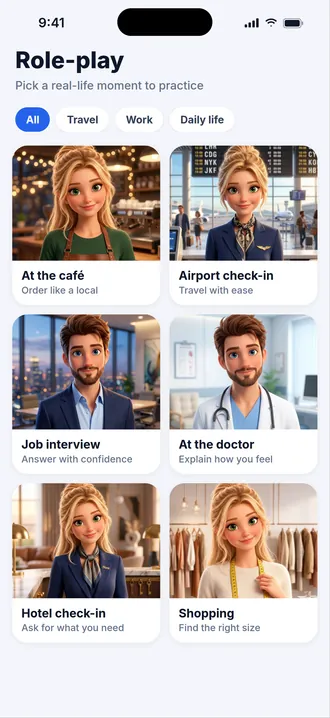
70+ roleplays and conversation topics
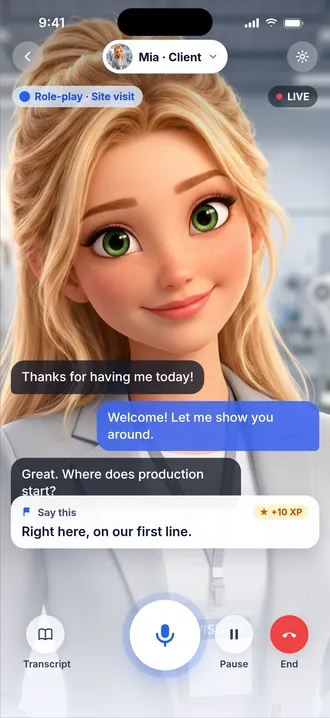
From small talk and job interviews to a full workplace & sales pack: a cold-call pitch, a product demo, handling objections, closing, negotiating, and client calls — the conversations professionals actually have.
From the workplace & sales pack
- Cold-call pitch
- Product demo
- Handling objections
- Closing the deal
- Negotiation
- Client calls
Four skills scored on every answer
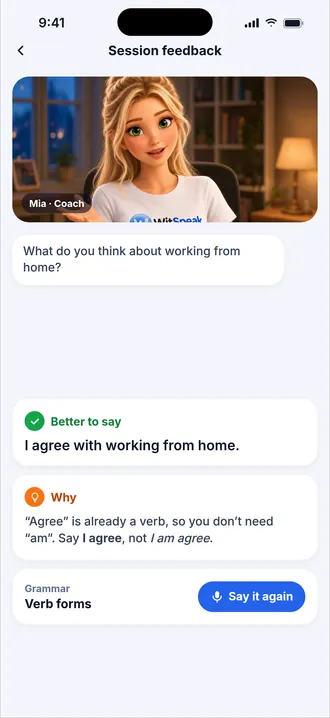
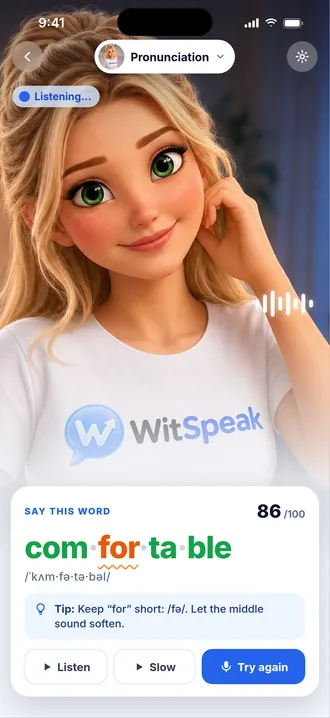
Fluency, vocabulary, grammar and pronunciation, with a specific correction after every reply — so learners fix a habit while it's fresh, not a week later.
Guidance in 44 languages
Instructions, explanations and feedback in the learner's own language, so beginners always know what to do next.
Their own custom scenarios
Learners can build the exact conversation they're preparing for — a specific client meeting, a visa interview, a conference talk — and rehearse it as many times as they need.
iPhone and Android
Learners practice on the phone already in their pocket. Nothing to install on a computer, nothing to schedule.
What you see
A coach panel built around your next session.
Open it before a session and you know who practiced, what they struggled with and where they've moved — without asking.
Groups with join codes
Create a group per client, cohort or level and share a join code — learners join from the app in minutes.
Assignments between sessions
Assign specific scenarios as homework and see who completed them before you next meet.
Weekly progress per learner
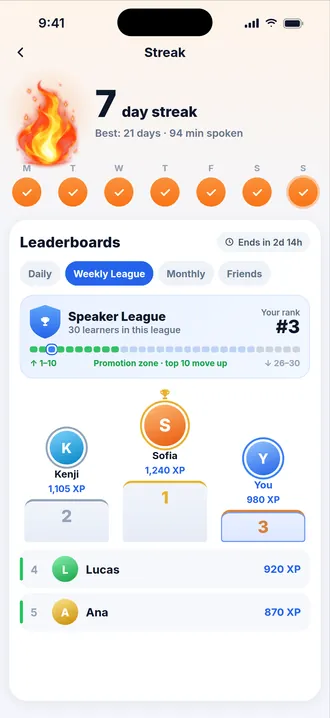
Speaking minutes, sessions, streak, CEFR-aligned level progression and scores across all four skills — week by week.
Transcripts, with consent
Written transcripts and the AI's corrections, so you can coach the exact sentences a learner struggled with. Never audio.
CSV export & weekly reports
Download the numbers for your own reporting, and get a weekly summary of every group in your inbox.
You see progress metrics and skill scores for every learner. You can read written transcripts and corrections from a learner's practice sessions only when that learner agreed to share them on joining — they can switch it off at any time, and sessions they mark private are never shared. Learners' voice recordings are never available to coaches — by design.
How it works
Live in an afternoon.
- 1
Create your workspace and pick your seats
Sign up, choose how many learner seats you need (from five), and start the 14-day trial with your card — nothing is charged until it ends.
- 2
Learners join with your code
Create a group, share the join code, and your learners are in — on iPhone or Android, with guidance in their own language.
- 3
Follow progress and set assignments
Watch weekly minutes, streaks and skill scores, assign scenarios between sessions, and read consent-shared transcripts to plan what's next.
Coach plan
One price per learner. No contracts.
Every seat is a learner with full access to the app plus your coach panel. Add seats as your practice grows; remove them when a learner finishes.
- 14-day trial, card required — nothing is charged until the trial ends
- Cancel anytime
- Minimum 5 seats
- Add or remove seats any time
Coach plan
Loading your local price…
Billed monthly by card. Prices exclude tax. Business VAT ID accepted at checkout; invoices available in your billing portal.
Coaches FAQ
What coaches ask us first.
What exactly can I see about my learners?
Progress metrics for every learner: weekly speaking minutes, sessions, streak, CEFR-aligned level movement and scores across fluency, vocabulary, grammar and pronunciation. If a learner agrees when joining your group, you can also read written transcripts of their practice sessions and the AI's corrections. Learners can turn that off at any time, and sessions they mark private are never shared. You never hear their voice — practice recordings are never available to coaches.
How is learner data handled?
Practice data powers the learner's own feedback and progress — nothing else. No ads, no selling of personal data. Learners decide at join time whether to share transcripts with you and can withdraw that at any time; removing a learner from your group ends your access to their data immediately, and learners can delete their own account whenever they wish. Learners under the digital-consent age of their country (for example under 16 in much of the EU) are activated only after a parent or guardian consents. Our privacy policy spells out exactly what is collected.
How does billing work — and what about VAT?
You pay by card, per seat, monthly, at the price shown for your country. Prices exclude tax: VAT or sales tax is added at checkout where it applies, and a valid business VAT ID entered at checkout is applied to the invoice. Every invoice is available in your billing portal. Seat changes are prorated within the month.
A learner finished — can I give their seat to someone new?
Yes. Remove the learner from your group and the seat frees up immediately; the next learner joins with your code. You can also lower your seat count at any time, down to the number of learners currently holding one.
Which languages does the app support?
Learners practice speaking English; the app's guidance, explanations and feedback are available in 44 languages, so a beginner in France, Vietnam or Türkiye always understands what to do next.
What do learners need?
An iPhone or Android phone and a quiet moment to speak. They install WitSpeak, enter your join code and start practicing — nothing to set up on a computer.
How do I cancel?
From your billing portal, in a couple of clicks. Your workspace stays active until the end of the period you've paid for, and nothing renews after that. If you cancel during the 14-day trial, your card is never charged.
Talk to us
Coaching more than a handful of learners?
Tell us about your practice — how many learners, what they're preparing for — and we'll reply within one business day with the setup that fits.
support@witspeak.ai
Ready to hear your learners improve between sessions?
Start your 14-day trial today. Five seats or fifty — the price per learner is the same.